
14.0: The Role of Presentation Aids
Lee Ann Dickerson
Learning Objectives
- Define presentation aids.
- Explain the role of presentation aids in helping a speaker communicate more effectively.
- Identify ways presentation aids can help an audience understand and remember key ideas.
- Describe how audience-centered communication involves accessibility considerations.
It may seem strange to begin a chapter about presentation aids by talking about something that is not, in fact, a presentation aid. However, by doing so, we hope to make clear not only what presentation aids really are but also why they can be so useful to speakers and audiences alike.
What Are Presentation Aids?
Imagine that you are preparing to speak at your commencement. First, congratulations on your graduation! You have been informed that you will be assigned a certified American Sign Language (ASL) interpreter for your speech at the event. Sign language interpreters use their hands and facial expressions to translate the meaning and intent, words and tone of voice into visual-manual language. Interpreters certified by the Registry of Interpreters for the Deaf abide by a Code of Professional Conduct that emphasizes skill, respect, and ethics. Specifically, ASL interpreters are expected to “render the message faithfully by conveying the content and spirit of what is being communicated, using language most readily understood by consumers, and correcting errors discreetly and expeditiously” (Registry of Interpreters for the Deaf, 2005). The interpreter’s responsibility here is twofold: to translate your spoken message into a different communication mode for the audience and to ensure that the message is perceived as clearly and accurately as you intended it. While the interpreter plays a vital communicative role, their work is not a presentation aid. Rather than supporting your message directly as part of your rhetorical strategy, the interpreter mediates (conveys between parties) your message to ensure access for audience members who would not otherwise be able to perceive it.
Our non-presentation aid scenario above offers us two key insights into how we should think about actual presentation aids. First, effective communication is audience-centered. For communication to succeed, an audience needs to perceive it. A spoken message reaches those who can hear it; a signed message reaches those who can see it. Neither form is more or less valid, but each must be matched to the perceptual abilities of the audience to succeed. Second, communication is multimodal. The interpreter’s presence demonstrates that a single message can be communicated through more than one form of meaning—spoken words or signed language, sound or gesture. Meaning can actually be constructed in many forms: speech, sound, body, object, image, text, and even space (Kalantzis & Cope, 2025). Every speech already involves multiple modes. Audiences hear us, see us, and often take in more than we realize. Presentation aids allow us to build on that inherent multimodality by intentionally adding to or enhancing how meaning is communicated.
These insights now help us define what presentation aids actually are. Presentation aids are speaker-directed materials that support how an audience perceives and makes sense of a message. Presentation aids are not mere decorations or filler, nor are they simply tools to assist the speaker or translate a message, as we saw in our interpreter scenario. Instead, they are communication strategies that a speaker intentionally uses to help audiences see, hear, or grasp a message more clearly.
With our definition in mind, let’s turn to what that means for you as a speaker. We’ll next examine how audiences receive messages across different sensory channels, what makes that perception possible, and why presentation aids are a matter of both rhetorical strategy and responsibility.
Why Use Presentation Aids?
When we think about public speaking, it’s easy to focus only on what we’re going to say. Without words, of course, there is no speech to begin with. But communication isn’t merely about what we say; it’s also about what audiences receive. While an audience listens to our voice, they’re also taking in other sensory information: what they see, how they feel, where they are, and what’s happening around them. As these sensory inputs come in, the brain begins sorting them. Some information is filtered out, and other signals move on for further processing. Different types of input engage different regions of the brain, so when speakers use images or movement in addition to words, they activate multiple processing pathways in their listeners at once. Engaging more channels—visual, auditory, spatial—gives an audience more than one way to receive and process your message.
Now that we’ve explored how audiences take in information, let’s consider how you can apply that knowledge through the use of presentation aids. Presentation aids help you intentionally create a multisensory experience. When used alongside your spoken words, they can reinforce key points, clarify complex ideas, and reduce cognitive load, which is the mental effort it takes for your audience to absorb and organize new information. Aids can also help audiences follow the flow of your ideas by highlighting structure or showing a clear sequence. In some cases, a multisensory experience can also support an emotional connection, especially when the content is designed to connect with an audience’s values or experiences.
A multisensory experience is especially powerful when you pair visual elements with spoken explanation, a process known as dual-channel processing. According to the Cognitive Theory of Multimedia Learning (Mayer, 2009), people learn better when information is presented in both visual and auditory channels. This theory was developed in the context of classroom learning, but it applies directly to public speaking. Whatever your rhetorical purpose, your goal is to help your audience understand and remember what you’re saying. Combining words with visuals gives the audience more than one path to understanding. Aids like graphs, images, objects, or simple diagrams can also make your content more memorable and help sustain attention. In short, well-chosen presentation aids are purposeful strategies for strengthening communication. Table 14.1 below summarizes what presentation aids do and how they can help an audience.
| What Presentation Aids Do | How Presentation Aids Help the Audience |
|---|---|
| Reinforce and support memory | Emphasize key ideas in ways that help the audience remember your message |
| Clarify complex ideas | Make abstract or detailed information easier to understand |
| Reduce cognitive load | Simplify mental processing by presenting information in more than one way |
| Highlight structure or sequence | Reveal the organization of ideas or steps to help the audience follow the message flow |
| Engage multiple senses | Activate different parts of the brain to support understanding |
| Sustain attention | Keep the audience engaged by adding meaningful variety to the presentation |
| Support emotional connection | Reinforce tone and meaning in ways that connect with the audience’s feelings and experience |
 AI Insight
AI can generate quick prototypes for slides, infographics, or diagrams. However, speakers must evaluate these carefully for accuracy, bias, and audience appropriateness. Using AI responsibly means treating it as a design partner—not as a substitute for judgment.
Presentation aids serve these purposes best when they’re designed with the audience in mind. That’s an audience-centered approach: thinking not just about what’s being said, but also about how others will receive and make sense of it.
Audience-Centered Communication
Audience-centered communication means planning your message with your listeners’ needs, abilities, and perspectives in mind. It’s not just about expressing ideas; it’s about making sure an audience can receive them. Different people experience presentations in different ways. Some may have difficulty hearing what you are saying. Others may have difficulty seeing your slides remotely on a small screen. Because differences such as these can affect how the message is perceived, audience-centered speakers make intentional choices to communicate clearly to as many people as possible. When it comes to presentation aids, that means selecting formats, visuals, and delivery methods that help everyone access and understand the presentation.
Making content—and the ideas behind it—available to different kinds of audiences is central to the goal of accessibility. When something is accessible, it can be used by people with a wide range of abilities. In digital communication, accessibility is guided by recommendations developed by the World-Wide Web Consortium (W3C), an international organization that promotes web usability for all people. W3C publishes the Web Content Accessibility Guidelines (WCAG, pronounced “wuh-cag”), which help make online content more accessible. The W3C’s Web Accessibility Initiative (WAI) maintains these guidelines and offers regularly updated resources on accessibility principles and practices (W3C Web Accessibility Initiative, 2025). WCAG guidelines are organized around four principles for digital media, often remembered by the acronym POUR: Perceivable, Operable, Understandable, and Robust. In simple terms, POUR means materials should be presented in ways people can see or hear, navigate using different tools, understand clearly, and access across devices or platforms.
Figure 14.1: WCAG Principles
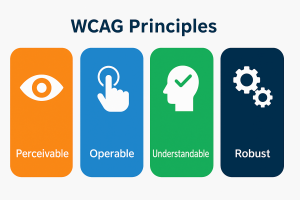
Image Long Description
The image displays the four foundational principles of the Web Content Accessibility Guidelines (WCAG). Each principle is represented by a vertical colored block, containing both an icon and a label:
- Perceivable (orange block): An eye icon symbolizes the ability for users to perceive content through sight, sound, or touch.
- Operable (blue block): A hand pressing a button represents that interfaces must be usable via various input methods like keyboard or mouse.
- Understandable (green block): A human head with a checkmark signifies that information and interface operation must be clear and easy to follow.
- Robust (dark blue block): Two interlocking gears illustrate that content should be compatible with a variety of user agents, including assistive technologies.
Above the four blocks, the header reads “WCAG Principles” in bold navy-blue text.
Text Transcription
Header:
-
WCAG Principles
Principles and Labels:
- Perceivable
- Operable
- Understandable
- Robust
More than just best practices, WCAG is the recognized standard for digital accessibility under the Americans with Disabilities Act (ADA). In university and workplace contexts, presenters often have a legal obligation to make their digital materials accessible in ways that align with WCAG. While students may not always be expected to manage full compliance on their own, awareness of these expectations is part of becoming a responsible communicator.
 Beyond the Podium Insight
When you design an aid with accessibility in mind, you’re committing to more than compliance. You’re recognizing that communication extends beyond the podium, across diverse audiences and contexts. An aid that works in the moment should also support continued learning and inclusion afterward.
Though WCAG was designed for websites and applies primarily to digital media, its core principles can also inform how we prepare and present materials in a live or recorded speech. Whether you’re using slides, sharing a handout, or using a prop during a live speech, your goal is the same: to make sure your audience can see, hear, or otherwise experience what is being presented. You don’t need to become a WCAG expert to be a responsible communicator, but the idea that content must be presented in ways people can notice and process is a useful starting point. Later in this chapter, we’ll explore some specific ways to apply WCAG to digital presentation aids. For now, what matters is recognizing that being audience-centered also means being access-aware.
Responsibility and Purpose
Presentation aids play a powerful role in how messages are received. They are communication choices that present ideas in multimodal, audience-centered ways that help listeners perceive, process, and remember the message. When chosen with care, presentation aids reinforce key ideas, clarify complex points, and help audiences stay focused and engaged. But when presentation aids aren’t planned with the audience in mind, they can get in the way of understanding or make it harder for people to engage with the message. It is our responsibility as speakers to use presentation aids that support rather than compete with our speech content.
When we think beyond the podium, we begin to see communication as more than what is said out loud. It’s the slides we show, the visuals we create, the materials we share, and the choices we make to help others engage with our message. Presentation aids extend our reach across senses, across formats, and sometimes beyond the moment of the speech itself. Planning them with purpose is part of being a thoughtful, audience-aware communicator.