
14.1: Types and Examples of Presentation Aids
Lee Ann Dickerson
Learning Objectives
- Explain how presentation aids can be categorized based on sensory perception.
- Identify the primary characteristics of visual, auditory, tactile, and multisensory presentation aids commonly used in classroom settings.
- Distinguish between presentation aids that engage a single sense and those that engage multiple senses.
- Describe how a single presentation aid might function differently depending on how it’s used.
We’ve discussed what presentation aids are and why they matter, and we have seen that communication can take many forms and engage multiple senses. Now, we take a closer look at how audiences perceive presentation aids by grouping them according to sensory experience and considering examples of each. We’ll also examine multisensory aids, which leverage two or more sensory pathways in a single format. This framework gives us a way to identify and talk about presentation aids based on how they’re perceived and experienced by the audience.
Visual Presentation Aids
Visual presentation aids are materials that communicate information through what an audience can see. They support a message by presenting content in a visual format such as images, text, symbols, and the spatial relationships among those visual elements. Visual presentation aids help an audience see key information clearly and in context during a speech. They are often created as digital materials that are projected on screens or shared online, but they can also appear in printed formats such as posters, handouts, or drawings. Some are static, like photographs or charts; others may be dynamic, such as slides with timed animations or demonstrations.
For example, a speaker might use a graph to show changes in economic data over time or a map to highlight regional differences in access to clean water. A photograph of volunteers distributing supplies after a hurricane can add emotional or historical depth, while a timeline that traces milestones in vaccine development clarifies sequence. A diagram of bicycle components or the stages of the digestive process can illustrate how parts of a system interact, and a slide deck with keyword text and images keeps main points visible. A screen demonstration can walk the audience through a scheduling application step by step.
Figure 14.1: Examples of Visual Presentation Aids
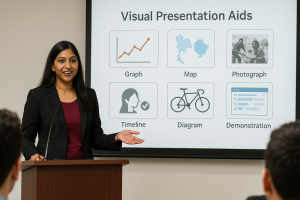
Image Long Description
A woman stands behind a lectern, giving a presentation. She is dressed in a black blazer and maroon top and gestures with one hand while speaking. Behind her is a projected slide titled “Visual Presentation Aids”, featuring six labeled icons arranged in two rows:
Top row (left to right):
- A line graph labeled “Graph”
- A map graphic labeled “Map”
- A photo of two people interacting, labeled “Photograph”
Bottom row (left to right):
- A silhouette head profile with a checkmark, labeled “Timeline”
- A bicycle illustration labeled “Diagram”
- A stylized browser window labeled “Demonstration”
Several people sit in the foreground, facing the presenter. The setting appears to be a professional or educational environment.
Text Transcription
Visual Presentation Aids
- Graph
- Map
- Photograph
- Timeline
- Diagram
- Demonstration
Auditory Presentation Aids
Auditory presentation aids are materials that communicate information through what an audience can hear. These aids support a message by adding or emphasizing sound-based content beyond the speaker’s own voice. They may include music, recorded speech, sound effects, or environmental audio (background sounds that represent a particular place, setting, or activity). Auditory aids can be played as recordings through speakers, embedded into other digital media, or even created live by the speaker. Auditory aids are experienced through sound, which unfolds over time. Unlike visual aids, which can often be seen as a whole at a glance, auditory materials are heard moment by moment.
In addition to the spoken words of their speech, speakers may use auditory presentation aids to intentionally support their message. A short audio clip from a historical speech could connect to a topic on civic life. A music excerpt might support a talk on hip hop’s global reach. A portion of a recorded interview could bring an expert’s voice into a presentation about space exploration. In a presentation about digital culture, a sound effect like a phone notification might help illustrate a point about attention. A speaker might even create a sound, such as tapping a pencil on the podium to demonstrate a common classroom distraction.
Figure 14.2: Examples of Auditory Presentation Aids
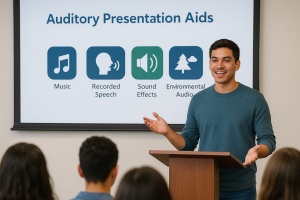
Image Long Description
A young man stands at a wooden podium, speaking to an audience. He is smiling and gesturing with his hands. Behind him is a projected slide titled “Auditory Presentation Aids” in large blue text. Below the title are four icons with labels:
- Music – icon of a musical note.
- Recorded Speech – icon of a silhouette of a head with sound waves near the mouth.
- Sound Effects – icon of a speaker emitting sound.
- Environmental Audio – icon of a pine tree and a cloud.
The audience is seated and facing the presenter, though their faces are not visible. The setting appears to be a classroom or training room.
Text Transcription
Auditory Presentation Aids
- Music
- Recorded Speech
- Sound Effects
- Environmental Audio
Tactile Presentation Aids
Tactile presentation aids are materials that communicate information through what an audience can physically touch or manipulate. These aids support a message by allowing the audience to experience texture, shape, or structure directly. Tactile aids may include everyday objects as well as materials designed specifically for touch-based interaction such as models, textured graphics, or items that can be assembled or manipulated. Tactile aids may be passed around during a speech, distributed for individual use, or involve the audience engaging with objects or sensations already within reach such as the texture of their clothing.
For example, a 3D model of a molecule can help explain structure in a chemistry presentation. A fabric sample, like a swatch of recycled material, might be used to support a talk about sustainable fashion. A raised-relief map can communicate topography in a speech about hiking the Appalachian Trail. A puzzle that can be assembled during the presentation might help illustrate a process or sequence. A speaker might also invite the audience to engage with something already available to them, such as tracing the veins on their own hands during a speech about human anatomy.
Figure 14.3: Examples of Tactile Presentation Aids
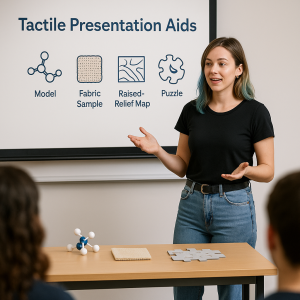
Image Long Description
A woman stands in front of a classroom giving a presentation on tactile learning tools. She is gesturing with both hands while facing a seated audience. Behind her is a large screen with the heading “Tactile Presentation Aids” and four labeled icons:
- Model – represented by a molecule-like icon.
- Fabric Sample – shown as a dotted square, resembling woven fabric.
- Raised-Relief Map – illustrated with wavy topographical lines.
- Puzzle – shown as a gear-shaped puzzle piece.
On the table in front of her are physical examples of each aid: a white and blue molecular model, a small textured square representing fabric, and interlocking gray puzzle pieces. Part of the audience is visible in the foreground, facing the presenter.
Text Transcription
Tactile Presentation Aids
- Model
- Fabric Sample
- Raised-Relief Map
- Puzzle
Other Sensory Presentation Aids
While most presentation aids rely on what an audience sees, hears, or touches, other sensory experiences may support communication in certain settings and for some topics. These include aids that engage smell, taste, or body movement. Olfactory aids use scent to connect with memory, emotion, or the environment, such as the smell of a particular spice in a speech about cultural cooking traditions. Gustatory aids involve taste, such as offering a food sample during a talk about regional cuisine. Kinesthetic aids ask the audience to move in some way, such as standing, mirroring a gesture, or tracing a pattern in space during a presentation on posture or physical awareness. These aids may not be practical or permitted in all speaking settings. Though less common, these types of aids serve as reminders that communication can engage many senses.
Multisensory Presentation Aids
 Beyond the Podium Insight
Multisensory aids remind us that communication isn’t confined to spoken words. Beyond the podium, meaning spreads across modes—images, sounds, movements, or even tastes and smells. The more strategically you extend your message, the longer it resonates.
Multisensory presentation aids are materials that engage more than one sense at the same time. These aids combine elements from different sensory categories such as sight and sound or touch and movement into a single format or experience. Unlike the previous categories which emphasize one dominant sensory channel, multisensory aids create layered experiences that an audience sees, hears, or feels simultaneously. A multisensory experience can deepen attention or create a more immersive way of understanding content.
Multisensory aids may include formats such as videos with sound and motion, interactive demonstrations that involve both seeing and touching, or digital media that combine animation, narration, and text. For example, a speaker might show a short video clip that combines images, narration, and background music to illustrate a cultural movement. A live science demonstration might include both a visible chemical reaction and an audible sound. A touchscreen interface or physical prototype might invite an audience to both look at and manipulate a design. Even a slide deck with carefully timed animations and synchronized voice-over can function as a multisensory aid when it supports more than one sensory channel at once.
Sense Perception in Practice
In this section, we explored presentation aids based on how audiences perceive them. While these categories are useful for understanding the different ways presentation aids can support communication, they aren’t fixed. The same object might serve more than one purpose depending on how it’s used. A baseball glove, for example, might function as a visual aid when held up for the audience to see, a tactile aid if passed around for them to feel, an auditory aid when it is snapped closed for emphasis or effect, and even an olfactory aid if the audience is invited to smell the leather.
This flexibility reminds us that perception is shaped not just by the aid itself but by how it is designed into the speech. Presentation aids are not limited to a predefined list. They can and should reflect your creativity, your purpose, and the experience you want your audience to have. Thinking of presentation aids as part of an audience experience rather than simply materials to show can lead to more intentional and engaging choices. The same visual or object might have a different impact depending on how and when it’s introduced.
A well-chosen aid can spark curiosity, invite reflection, or create a moment that sticks with your listeners long after the speech ends. Some aids may even be accessed after the presentation, such as in a recording or handout, which extends the reach and impact of your message. What the audience perceives is shaped not only by the content of the aid, but also by how that content is framed, timed, and integrated into your message. Not every message requires a presentation aid, but when used with purpose, they become part of how the speech is experienced and remembered.
Now that we have a framework for identifying and describing presentation aids based on sensory experience, we’re ready to take the next step: deciding when, how, and why to use them. In the next section, we’ll look at how to choose and plan presentation aids that support your message, your audience, and your goals as a speaker.
Try It! Presentation Aids
Activity Introduction: Now that you’ve seen examples of how presentation aids can engage different senses, try classifying them for yourself. This activity will test whether you can connect the right type of aid with the examples we’ve discussed.
Wrap Up: Each example highlights how a single aid aligns with sensory perception. As you prepare your own speeches, think carefully about which sense you want to engage—and how that choice will shape your audience’s experience.