
14.2: Planning and Choosing Presentation Aids
Lee Ann Dickerson
Learning Objectives
- Apply the PACT framework (Purpose, Audience, Context, and Tools) to guide decisions about whether and how to use a presentation aid.
- Integrate AI-generated presentation aids effectively to enhance audience understanding.
Not every speech or every moment within a speech benefits from a presentation aid. Effective speakers make strategic decisions based on a combination of factors. Here, we examine four key considerations to guide your planning: Purpose, Audience, Context, and Tools. Together, these form a PACT—a framework for making thoughtful, audience-centered choices about whether and how to use an aid. These elements are not steps in a fixed sequence. Instead, they are interdependent aspects of a single decision-making process that helps you choose aids that serve your rhetorical goals.
Purpose
Presentation aids are most effective when they serve a clear purpose that emerges directly from your message. What are you trying to accomplish with your speech? If your message would be clearer, more memorable, or more engaging with support from a perceptual channel beyond your spoken words (e.g., auditory or visual), then a presentation aid may be helpful.
When planning, ask yourself: What do I want this aid to help my audience do that my words alone might not?
Section 14.1 introduced seven core functions that presentation aids can serve. These functions reflect the rhetorical goals speakers often have at key moments in a speech. In Table 14.2 below, we revisit those goals with examples to help you reflect on whether an aid could support your content. These examples aren’t rules; they’re possibilities. Identifying your purpose can help you determine whether an aid adds real value to your message.
| Communication Goal | When You Might Use a Presentation Aid |
|---|---|
| Reinforce and support memory | A slide lists five key concepts so that the audience can refer back to them during your explanation. |
| Clarify complex ideas | A labelled diagram illustrates how different parts of the brain interact during a sleep cycle as you explain the process. |
| Reduce cognitive load (i.e., mental effort) | A comparison table distinguishes three similar-sounding terms to simplify audience processing. |
| Highlight structure or sequence | A slide labels each section of a three-part solution as you transition between them. |
| Engage multiple senses | A short audio clip plays rainforest sounds in the background to immerse the audience in your verbal description of the setting. |
| Sustain attention | A poll or question slide prompts the audience to consider their own experience before you continue. |
| Support emotional connection | A photo at the start of a speech on food insecurity helps humanize the topic. |
These goals often overlap. A single presentation aid might support memory while also clarifying a complex idea or helping sustain attention. What matters most at this stage is identifying your intent. Be intentional. The aid should serve a clear purpose in helping your audience engage with and understand your message.
Audience
A presentation aid works only if an audience can perceive and make sense of it. Your audience analysis has already helped you think about who your listeners are and what they might need. Now, apply that thinking to perception. A presentation aid that works well for one audience may not be perceivable in the same way by another. Audience members differ in how they see, hear, think, and process information. Some may have limited vision or hearing. Others may experience information differently because of cognitive differences.
The goal isn’t to predict every individual need, but to plan with awareness and flexibility. Accessibility doesn’t require that every audience member has the same experience. Accessibility means making meaning available in more than one way. If some audience members may not be able to see or hear a particular aid clearly, consider whether it can be supported through more than one sensory channel. There’s no single solution, just thoughtful choices that match your audience’s needs.
When planning, ask yourself: Will my audience be able to perceive and interpret this aid in the way I intend?
Perception, however, is only part of the picture. Audiences don’t simply receive meaning—they interpret it. What makes sense to you might be unfamiliar, confusing, or even alienating to someone else. A joke, reference, image, or metaphor may carry different meanings for different people depending on a person’s background, values, knowledge, or expectations. Every aid carries assumptions. The more aware you are of those assumptions, the more intentional your choices can be.
Intentional planning doesn’t mean you can anticipate everything, but it does mean thinking beyond your own perspective. Effective speakers choose presentation aids that avoid overlooking relevant perspectives and consider what their audience is likely to know or expect. Presentation aids offer opportunities to connect, clarify, and engage, but only if they’re designed with the audience in mind.
Context
Even the most purposeful and audience-aware presentation aid won’t be effective if it doesn’t work within the conditions of your speaking environment. Context includes the space, time, technology, and constraints that surround your delivery. These may be physical, virtual, or a combination of both. These factors shape what kinds of aids will be practical, perceivable, and effective in the moment of your speech.
Delivery settings vary. In a live room, the size of the space, the seating arrangement of the audience, and the availability of equipment may affect whether your visuals can be seen or your audio heard. In a virtual setting, device differences and connectivity issues may limit access to media. Hybrid settings, in which some people are present and others are joining remotely, may introduce additional challenges, especially if not all audience members can engage with the aid in the same way. If your aid depends on technology (e.g., a sound clip, video, or interactive element), consider whether it will work smoothly in real time and whether it’s accessible to everyone present.
When planning, ask yourself: Will this aid work in the space I’m speaking in, under real-time conditions, without distracting from my message?
Timing is part of your context, too. If your speech is short, consider whether you have time to present the aid clearly, explain its relevance, and return to your message without disrupting the flow. Some aids may require transitions, setup, or explanation that pull attention away from your central idea. In those cases, it may be worth simplifying the format or integrating the content in a different way. Aids should support your delivery and not slow it down.
Tools
 AI Insight
AI design tools can help brainstorm layouts or create draft visuals, but they don’t know your purpose, audience, or context. Your responsibility as a speaker is to adapt AI outputs so they serve clarity, accessibility, and your rhetorical goals.
Tools are the means by which your presentation aid is created, displayed, or delivered. Some are physical tools such as a whiteboard, printed poster, or tangible object. Others are digital tools such as presentation software, video editors, design applications, or collaborative platforms. Some tools help you create the aid, some help you present or distribute it, and some do all three. What matters is how well the tool supports your message, suits your audience, and functions in your environment.
Tool choices vary depending on the situation. A digital slideshow might be effective in a virtual or hybrid presentation, while a handout or printed visual may be more effective in a small, in-person setting. Some tools support live interaction, like drawing on a table or writing on a board. Others are better for materials the audience might access later, such as linked documents or recordings. Whatever the format, your choice of tools should be guided by what makes your message perceivable, understandable, and usable for your audience.
AI tools can support your planning process by helping you explore, generate, and refine presentation aid options. For example, you might use them to draft visual examples, summarize complex text for a slide, or experiment with layout and sequencing. These tools can help you make early creative decisions, test possibilities, and prototype materials more efficiently. However, using AI effectively still requires judgment.
When planning, ask yourself: Which tools will help me create and deliver this aid clearly, effectively, and responsibly?
Like any presentation aid, AI-generated content should be evaluated through the PACT framework. Its usefulness depends on how well it serves your purpose and your audience, as well as how well it fits the conditions of your speaking context and functions reliably with your chosen tools. AI can streamline your design process, but it doesn’t replace the need for thoughtful, audience-centered decision-making. You are responsible for ensuring that any AI-assisted content is accurate, relevant, accessible, and aligned with your message.
Presentation Aid Planning Protocol
Deciding whether and how to use an aid requires thoughtful planning. The following planning protocol is built around the four elements of your PACT: Purpose, Audience, Context, and Tools. These elements reflect the understanding that using a presentation aid is more than a deign choice. It’s a kind of pact between you and your audience. By thinking carefully about what you want to communicate, who you’re speaking to, where the speech is taking place, and how your tools function, you can make informed decisions that support your message.
Figure 14.4: Applying the PACT Framework
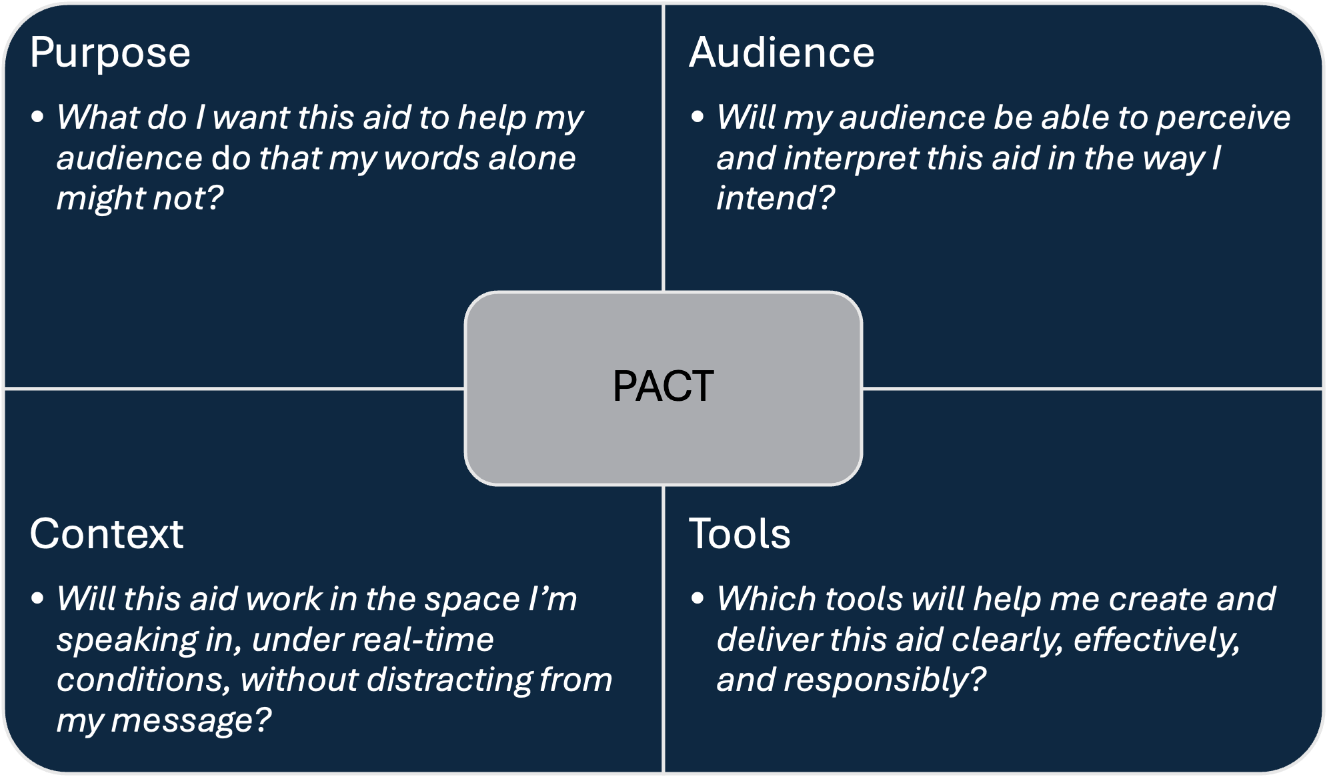
Image Long Description
This image presents a four-quadrant diagram titled “PACT,” an acronym representing Purpose, Audience, Context, and Tools. In the center of the diagram is a grey rectangle labeled “PACT.” Each quadrant has a dark blue background and includes a label and guiding question:
- Top-left (Purpose): What do I want this aid to help my audience do that my words alone might not?
- Top-right (Audience): Will my audience be able to perceive and interpret this aid in the way I intend?
- Bottom-left (Context): Will this aid work in the space I’m speaking in, under real-time conditions, without distracting from my message?
- Bottom-right (Tools): Which tools will help me create and deliver this aid clearly, effectively, and responsibly?
The visual is structured like a 2×2 matrix, with the central “PACT” label connecting all four components.
Text Transcription
Purpose
- What do I want this aid to help my audience do that my words alone might not?
Audience
- Will my audience be able to perceive and interpret this aid in the way I intend
Context
- Will this aid work in the space I’m speaking in, under real-time conditions, without distracting from my message?
Tools
- Which tools will help me create and deliver this aid clearly, effectively, and responsibly?
[Center: PACT]
When your decisions are grounded in purpose, responsive to your audience, suited to your context, and supported by the right tools, a presentation aid can elevate the impact of your message. If you plan to share your presentation materials in digital form, such as sharing slides or posting a recording, you may need to also meet accessibility standards. As noted in Section 14.1, guidelines like WCAG apply to digital content and help ensure it can be used by a wide range of audiences. In the next section, we’ll look more closely at what those standards involve and how to apply them when creating digital presentation aids for distribution.